As you already know …the Open Social Widget are so useful to extend the CLM Webinterface without any hacks or quirks. Today we will use sgvizler to visualise the results of CLM SPARQL queries. What me still really surprise is how less Javsscript code is necessary to create meaningful information.
Some Screen dumps…

Interactive Graphic …dragging is possible!
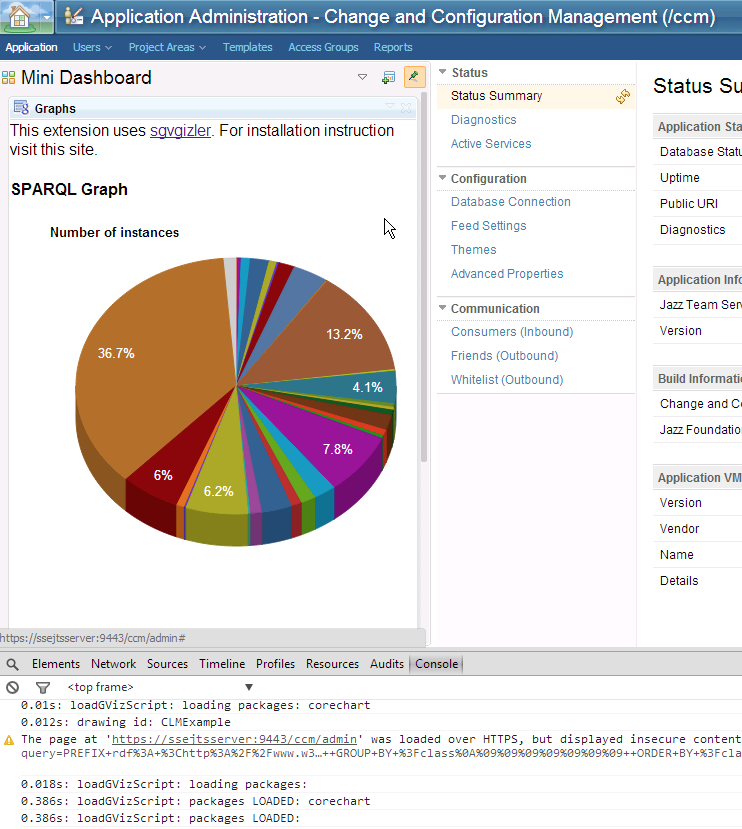
For this we need:
- A running CLM 4.0.6 environment with RELM and LQE
- SPARQL Endpoints: https://hostname:9443/SPARQL_Gateway you will find the SPARQL Endpoint https://hostname:9443/lqe/sparql
- SVGIZLER: Download svgizler from here SPARQLGraph our Open Social Widget download here
Codesnippets status.xml
<!--?xml version="1.0" encoding="UTF-8" ?-->

<![CDATA[
    	<link rel="stylesheet" href="css/style.css" type="text/css" media="screen" />
	<link rel="stylesheet" href="css/sgvizler.charts.css" type="text/css" media="screen" />

	This extension uses <a href="http://dev.data2000.no/sgvizler/">sgvgizler</a>. For installation instruction visit this site.

        <h4 class="title">SPARQL Graph</h4>

        <script type="text/javascript" src="lib/jquery-1.10.1.js"></script>
        <script type="text/javascript" src="https://www.google.com/jsapi"></script>
        <script type="text/javascript" src="lib/sgvizler.js"></script>
        <script src="js/status.js"></script>

        <div id="CLMExample"
		 data-sgvizler-endpoint="https://ssejtsserver:9443/lqe/sparql"
		 data-sgvizler-query="
					SELECT ?cm_title ?qm_title
					WHERE {
						?cm_uri
                                                        dcterms:title ?cm_title ;
							oslc_cm:testedByTestCase ?qm_uri .
						?qm_uri
							dcterms:title ?qm_title  .
					}
					ORDER BY ASC(?cm_shortTitle)
                                      "
		 data-sgvizler-chart="sgvizler.visualization.D3ForceGraph"
		 data-sgvizler-chart-options="maxnodesize=5"
		 style="width:900px; height:600px; border:1px solid black; display: inline-block"></div>

]]>
Codesnippets status.js
$(
function (){ sgvizler

.prefix('dcterms', "http://purl.org/dc/terms/")
.prefix('rdf',     "http://www.w3.org/1999/02/22-rdf-syntax-ns#")
.prefix('oslc',    "http://open-services.net/ns/core#")
.prefix('oslc_cm', "http://open-services.net/ns/cm#")
.prefix('oslc_qm', "http://open-services.net/ns/qm#")

.containerDrawAll(); }
);
 Steve Blog
#1 by Carlos on 11/04/2014 - 15:07
Stefan this is really great work@@@
#2 by rtcpractise on 11/04/2014 - 17:10
Thank you…and this is just the beginning!
🙂
#3 by rsjazz on 14/04/2014 - 13:17
Amazing stuff Stefan. Thanks for sharing!
#4 by Douglas on 03/10/2014 - 12:42
Introducing geometry to children is nothing more than a study of the shapes they have already encountered.
Go uup to the brush menu and open “Assorted Brushes. Joy, harmony, and glory”these are all a part of the stone’s rich history and legend, and she is
sure to feel these things as well when she receives
an Ashoka cut diamond ring as a gift this holiday.
#5 by Jacob Morales on 31/07/2017 - 22:06
This is very insightful! Thank you.
Just want to let you know that the link for your open social gadget is broken.