Creation Date: 19.05.2012
Revised: 0.1
Version: 1
Autor: PH and StH
Preface
In the following steps we will look at the details “how to access work items with the help of Jena over the OSLC interface”. If your are unfumiliar with OSLC and RTC please look at https://jazz.net/blog/index.php/2009/09/11/oslc-and-rational-team-concert/
and https://jazz.net/library/article/352. Also the following document gives you an overview how RTC use RDF: https://jazz.net/wiki/pub/Main/BuildingWithJFS/Building_Tools_Using_the_Jazz_Foundation.pdf
In Part1 we will see how to access the root services document with the help of Jena (create a Model/Graph, print the Model with a N3 notation).
1. Jena
Jena was invented by HP and at the end it became Open Source. The reason for using Jena is simple…RTC use it internally.
Jena help you with the following common tasks:
- read/write RDF documents
- parse/navigate RDF Graph (Model)
- query with SPARQL
- OWL inference
Alternative you can use Sesame at openrdf.org.
2. Using Jena with Eclipse
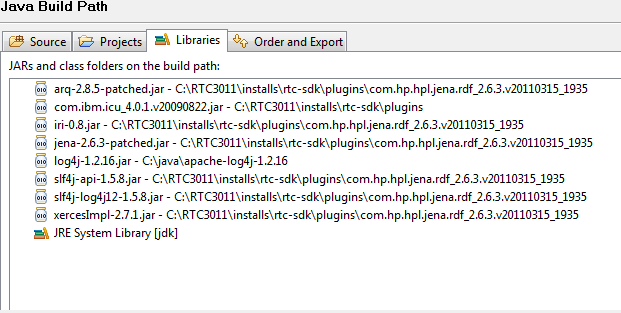
It is not necessary to download Jena http://jena.sourceforge.net when you installed the RTC SDK, because Jena is included inside the SDK.
Include the following Jar in your Eclipse classpath
3.Get the OSLC Examples
Download the OSLC Examples from OSLC-workshop-11292011.zip
3. Access the root service document
Change the Example01.java from the OSLC Workshop and insert:
/*******************************************************************************
 * Licensed Materials - Property of IBM
 * (c) Copyright IBM Corporation 2010, 2011. All Rights Reserved.
 *
 * Note to U.S. Government Users Restricted Rights:  Use,
 * duplication or disclosure restricted by GSA ADP Schedule
 * Contract with IBM Corp.
 *******************************************************************************/
package net.jazz.oslc.consumer.examples;

import java.io.BufferedReader;
import java.io.IOException;
import java.io.InputStreamReader;

import net.jazz.oslc.utils.HttpUtils;

import org.apache.http.HttpEntity;
import org.apache.http.HttpResponse;
import org.apache.http.client.ClientProtocolException;
import org.apache.http.client.HttpClient;
import org.apache.http.client.methods.HttpGet;
import org.apache.http.impl.client.DefaultHttpClient;

import com.hp.hpl.jena.rdf.model.Model;
import com.hp.hpl.jena.rdf.model.ModelFactory;
import com.hp.hpl.jena.rdf.model.NodeIterator;
import com.hp.hpl.jena.rdf.model.Property;
import com.hp.hpl.jena.rdf.model.RDFNode;
import com.hp.hpl.jena.rdf.model.ResIterator;
import com.hp.hpl.jena.rdf.model.Resource;
import com.hp.hpl.jena.rdf.model.StmtIterator;

/**
 * This first example describes how to access to the Root Services document
 * (https://localhost:9443/jazz/rootservices) using the Apache HttpClient APIs
 *
 * A Jazz Team server must be started.
 */
public class Example01 {

	public static void main(String[] args) {
		//============== Code to adapt to your own configuration =============//
		String server = "https://localhost:9443/ccm";		// Set the Public URI of your RTC server
		//============== -------------------------------------- =============//

		String rootServices = server + "/rootservices";
		System.out.println(">> Example01: Accessing Root Services document with HttpClient");
		System.out.println("	- Root Services URI: "+rootServices);

		// Setup the HttpClient
		HttpClient httpclient = new DefaultHttpClient();

		// Disabling SSL Certificate Validation
		HttpUtils.setupLazySSLSupport(httpclient);

		// Setup the HTTP GET method
		HttpGet rootServiceDoc = new HttpGet(rootServices);
		rootServiceDoc.addHeader("Accept", "application/rdf+xml");
		rootServiceDoc.addHeader("OSLC-Core-Version", "2.0");

		HttpResponse response;
		try {
			// Execute the request
			response = httpclient.execute(rootServiceDoc);
			System.out.println(">> HTTP Status code:" + response.getStatusLine());

			if (response.getStatusLine().getStatusCode() == 200) {
				System.out.println(">> HTTP Response Headers: ");
				HttpUtils.printResponseHeaders(response);

				System.out.println(">> HTTP Response Body: ");
				//HttpUtils.printResponseBody(response);

				HttpEntity entity = response.getEntity();
				if (entity == null) return;
				BufferedReader reader;
				try {
					//get the rootservice document
					reader = new BufferedReader(new InputStreamReader(entity.getContent()));

					//create Jena Model/Graph
					Model model = ModelFactory.createDefaultModel();
					model.read(reader, "https://localhost:9443/ccm");
					//Print RDF as N3
					//model.write(System.out, "N3");

					//model.setNsPrefix("oslc_cm", "http://open-services.net/xmlns/cm/1.0/");
					//NodeIterator objects2 = model.listObjectsOfProperty(model.createProperty("http://open-services.net/xmlns/cm/1.0/cmServiceProviders"));

					StmtIterator statements = model.listStatements((Resource)null,  model.createProperty("http://open-services.net/xmlns/cm/1.0/cmServiceProviders"), (RDFNode)null );

					//Get workitem catalog
					while(statements.hasNext()){
						RDFNode object = statements.next().getObject();
						System.out.println(object.toString());
					}

				} catch (IllegalStateException e) {
					e.printStackTrace();
				} catch (IOException e) {
					e.printStackTrace();
				}
			} else {
				// Release allocated resources
				response.getEntity().consumeContent();
			}
		} catch (ClientProtocolException e) {
			e.printStackTrace();
		} catch (IOException e) {
			e.printStackTrace();
		} finally {
			// Shutdown the HTTP connection
			httpclient.getConnectionManager().shutdown();
		}
	}

}
Useful links:
Introduction to Jena http://www.ibm.com/developerworks/xml/library/j-jena/
 Steve Blog