In this chapter we will create a basic Android Project with RTC as Versioncontrol and Build Management. The Android Project will be extended over the time, but for now there is just a simple Login Mask.
The next Blog Entries are about:
* Automated testing with Robotium
* Connect the Android Project with the RESTful interface of RTC.
* OSLC with Android
* Feedreader with an object DB like db4o.
* Usage of the Android Webkit
* Oauth with Android
..but back to our first task.
For automated builds the Android SDK uses Apache Ant , which RTC has great support for. In the following example I used the newest Android SDK, ANT 1.8 and RTC 3.0.1RC2. Download the Eclipse Project.
Any discussion will be welcome.
- Create a new Agile RTC Project with Android. Details at http://jazz.net/library/article/505. We will use a “Singel Stream” RTC Project. An add. good source of information is also at jazzpractise.
- Create a new Android Project Details at http://www.vogella.de/articles/Android/article.html. Put this Android Project into RTC Version Controll.
- Create a build.xml. Details at http://www.androidengineer.com/search/label/build
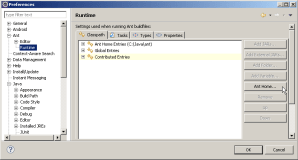
- Download ANT Version >1.8 and at the location of ANT inside Eclipse: Window->Preferences->Ant->Runtime . Push the Button “Ant Home…”
- Download the “Build System Toolkit” from and install/unzip it
- Create a RTC Build.
- Start your Jazz Build Engine with ” jbe -repository https://localhost:9443/ccm -engineId engine1 -userId myUser -pass userPasswd -sleeptime 1″ (substitute the userId/userPassword with your values)
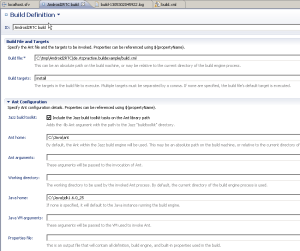
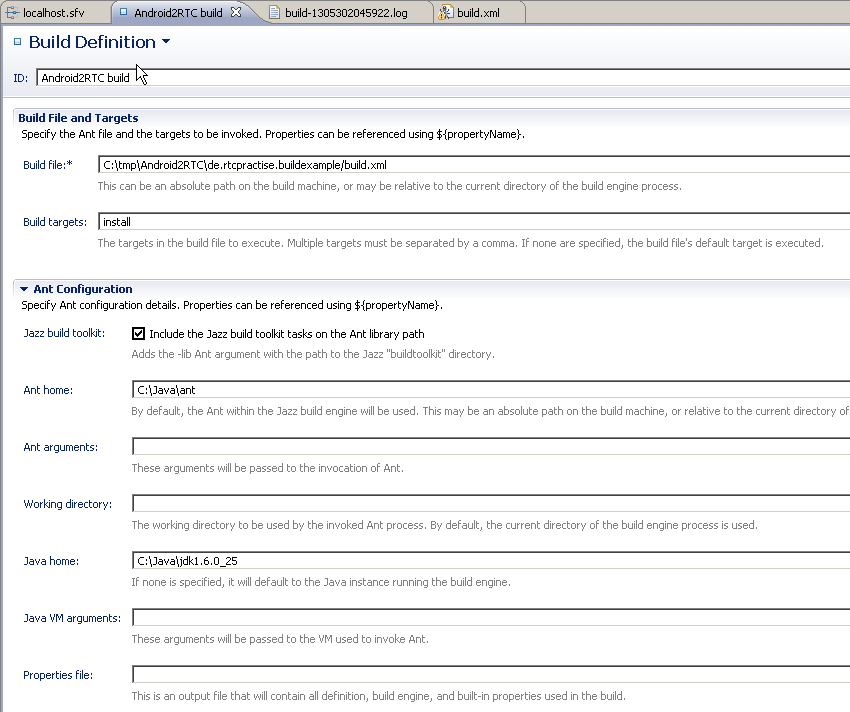
- Create a Build Definition with values like this:
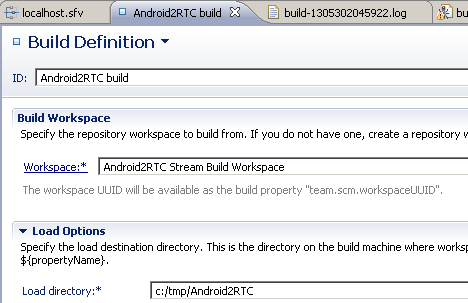
- Insert values like this in the “Source Control Tab” of the Build Definition:

ToDo/Missing:
* Automated start of an AVD Device, if not started
 Steve Blog